

I’ve used Migaku, and I understand why so many immersion learners swear by it. On a computer it’s excellent. You watch a show in Chrome, click a word you don’t know, and one more click saves the whole line as a flashcard with the audio and a screenshot. It’s the quickest way I’ve found to add words, and the card creation is the best thing about it.
The phone app is where it lost me. I’ve never had a worse experience with a language app on my phone, and if you do most of your studying on a phone, that matters more than any feature list.
Full disclosure: we make Gravity, so weigh my opinion with that in mind. Prices and features below come from Migaku’s own site and app store listings, checked in September 2026.
What Migaku gets right
Migaku’s browser extension is the best card maker I’ve used, and the best tool I know for sentence mining at a desk. It works in Chrome on Netflix, YouTube, Disney+, and Viki, and on ordinary web pages. Click a word and you get the meaning. Click again and the line becomes a flashcard with the sentence, the audio, a screenshot, and a definition.
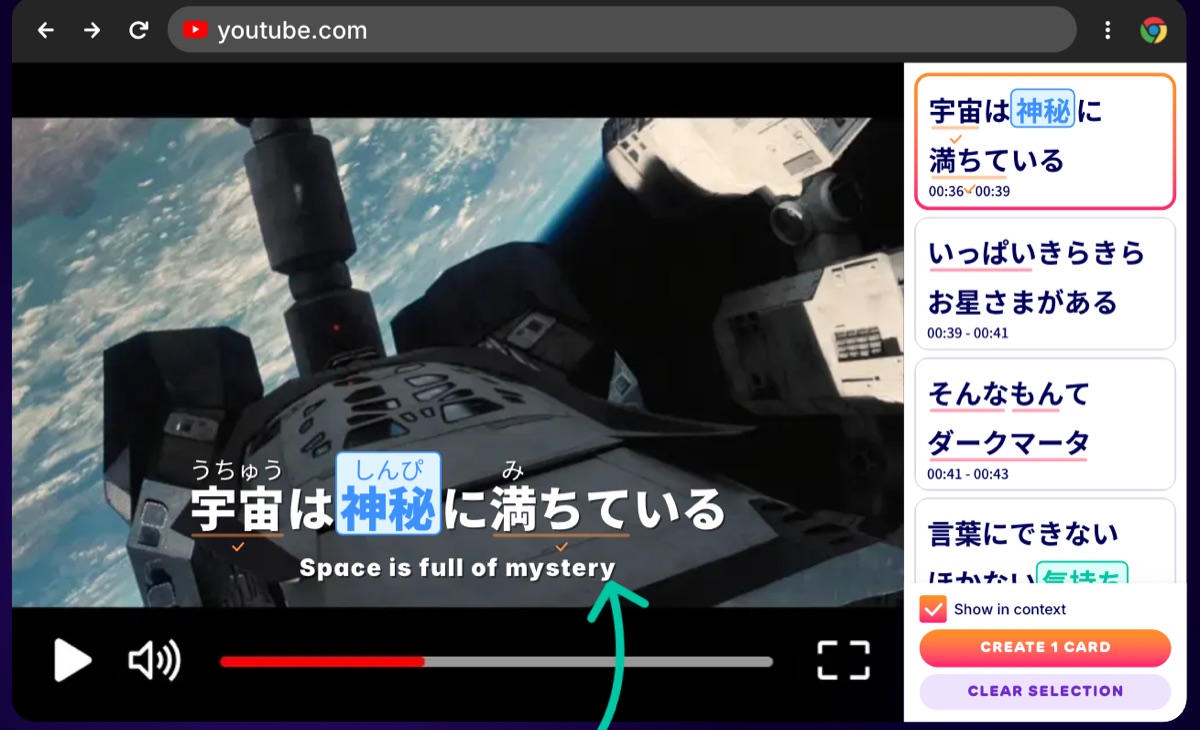 Migaku’s extension on YouTube, from the demo on migaku.com, September 2026.
It does plenty around that, too: beginner courses for Japanese with around 380 grammar points, pitch-accent colouring, an Anki add-on, and 11 languages. If you study at a desk, it’s hard to beat.
The phone app is another story
Migaku’s phone app covers plenty on paper: YouTube, podcasts, e-books, and text from screenshots. Using it was painful. The interface is bloated, there are buttons everywhere for things I never needed, and simple tasks took more taps than they should. Netflix, Disney+, and Viki don’t work on the phone at all, since Migaku’s FAQ lists YouTube as the only streaming site on mobile.
Why I’d pick Gravity on a phone
Gravity is a Japanese-only app built for your phone, with a hand-picked library of Japanese videos levelled from Pre-JLPT to N1. Four things set it apart for me.
Transcripts you can trust
Migaku works with whatever subtitles a video already has, and generates its own when there aren’t any. In my experience, that’s where things go wrong: auto-generated captions come through with mistakes, and the parser sometimes splits words in the wrong place or gives them the wrong reading. In early 2025, learners on the WaniKani forums documented the same problem.
In Gravity, we process and check every transcript before a video goes into the library, and we time each word to the audio. The line you read is the line you hear.
Lookups that fit the sentence
Tap a word and Gravity shows the meaning that fits the sentence you’re in. Japanese needs that: かける has more than a dozen meanings, and in 電話をかける you want “to make a call,” not “to hang.” When a tool splits a sentence wrong or grabs the first dictionary entry, you end up memorizing the wrong word. If you want more, Aio (our axolotl) explains what the word is doing in that exact line.
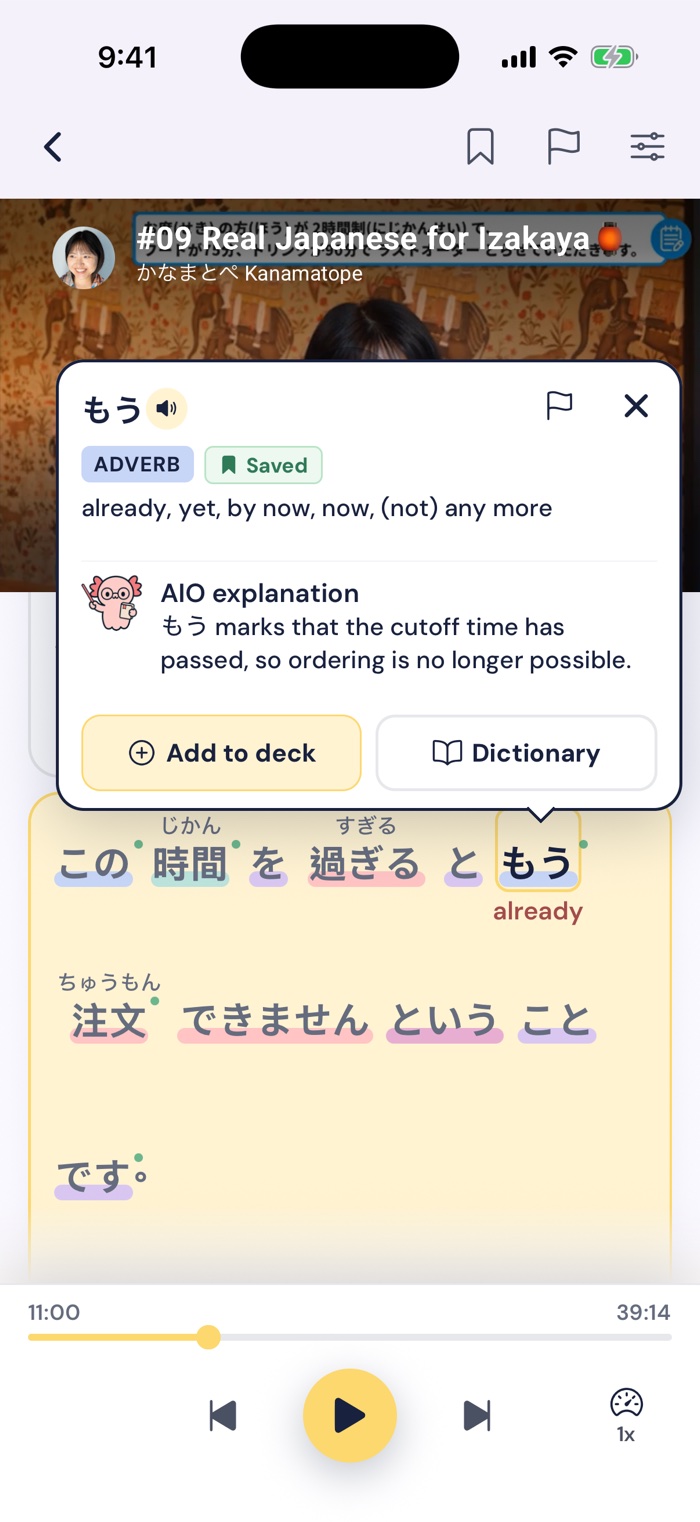
Tap もう in an izakaya lesson and Aio explains it in context: the last-order time has passed.
An app with nothing in the way
Gravity’s interface has what you need to learn and nothing else. Tap a word, tap Save, and it’s a flashcard, with a replay of the moment you heard it. There’s no extension to install and no card template to set up.
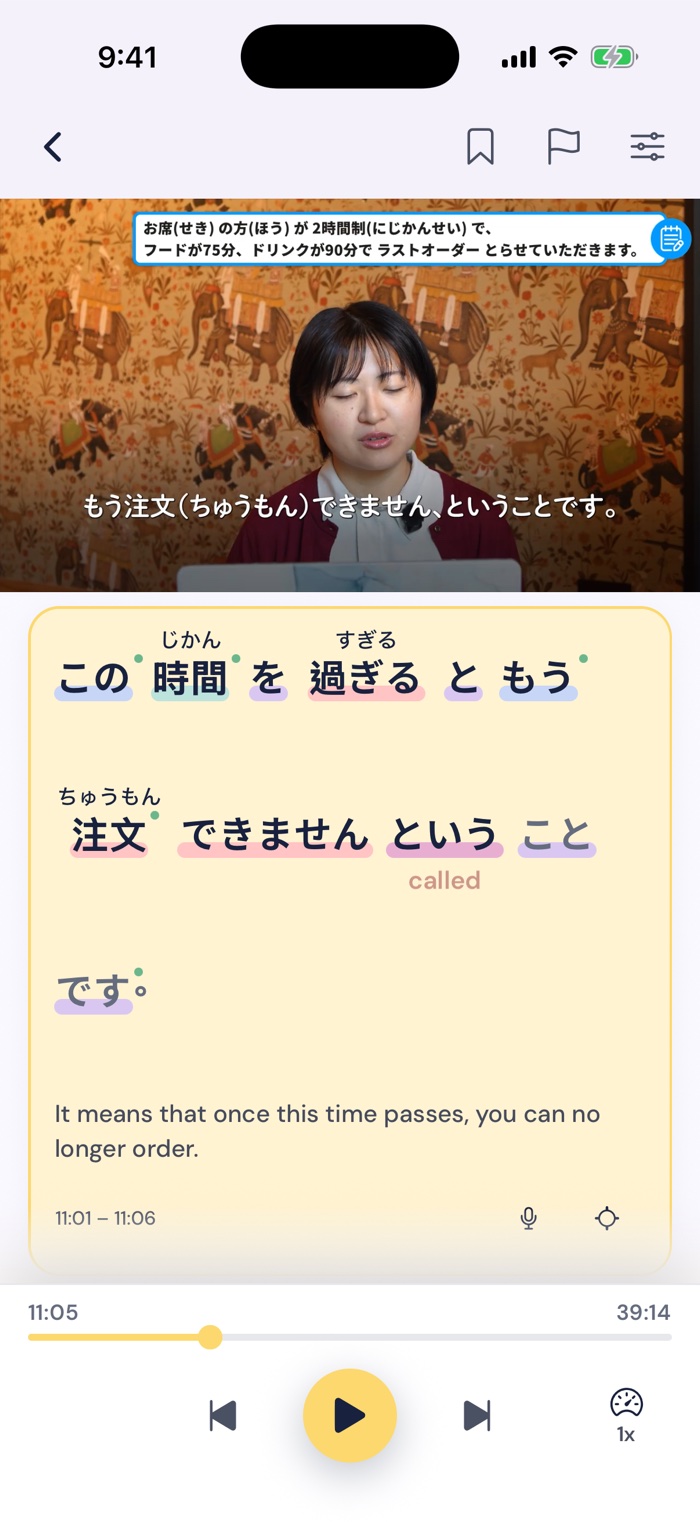
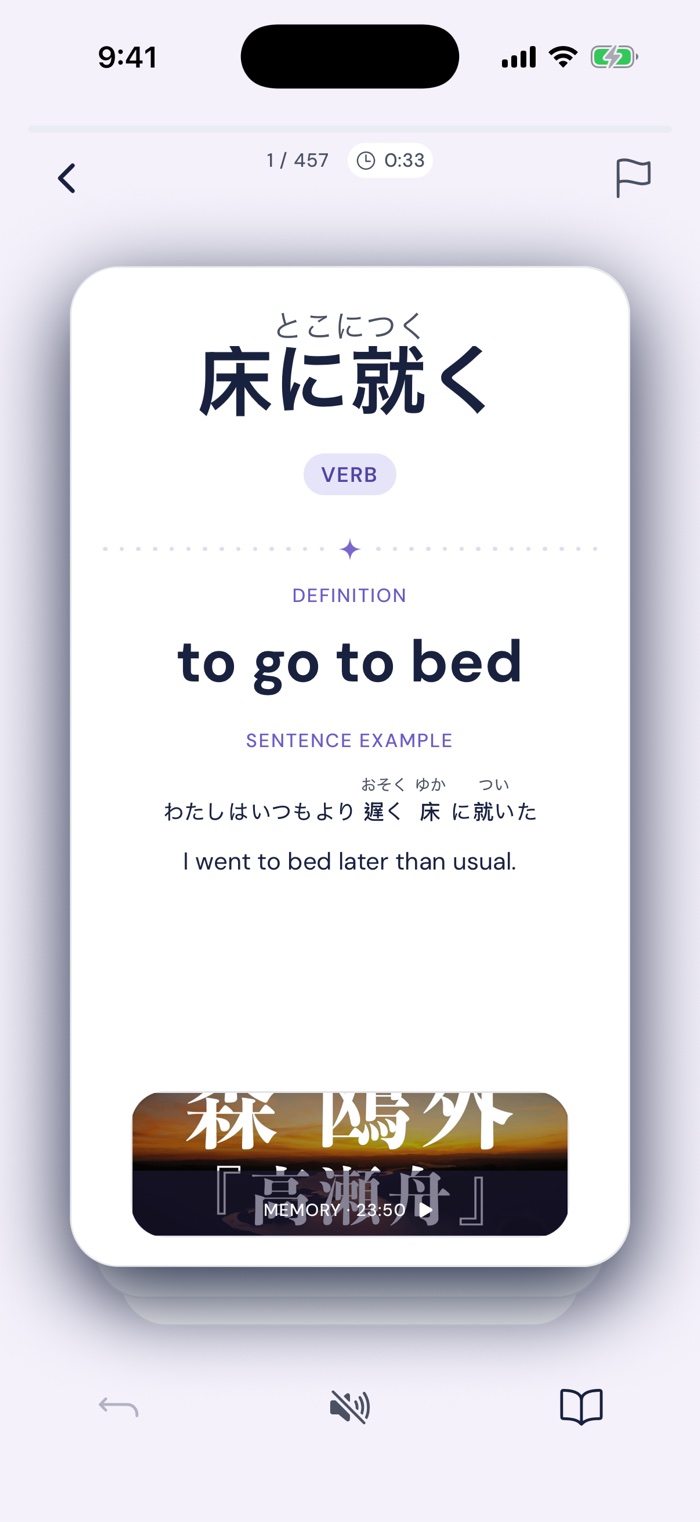
Tap a word in the transcript to save it; the flashcard keeps a replay of the clip you found it in.
Clips you can scroll anywhere
Then there’s Moments, a feed of short clips from the library, a minute or less each, that you scroll like any short-video app. When a word catches you, tap it, save it, and keep scrolling. You can get through a few clips on the train, in a queue, or on the toilet, and every one of them is real Japanese.
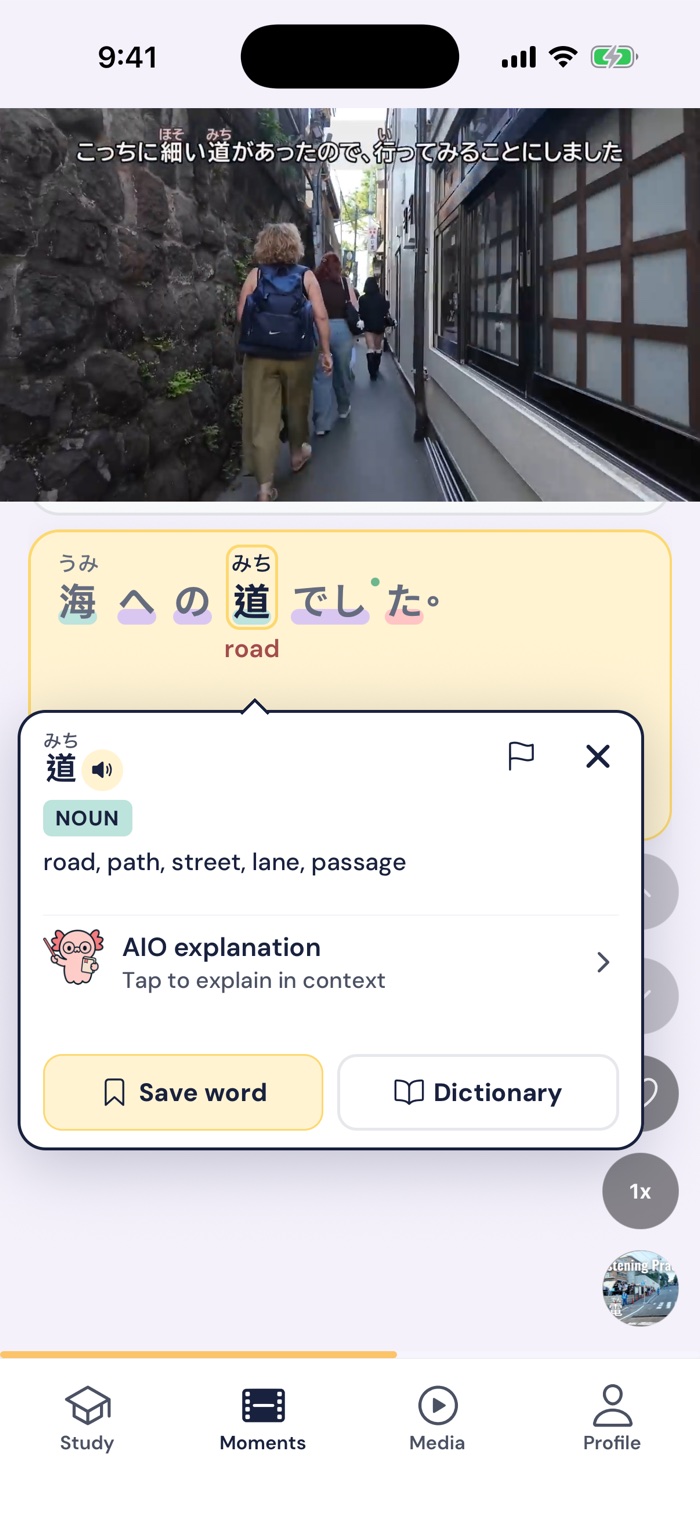
Moments: scroll short clips, tap any word, and save it.
When Migaku is still the better pick
If you study at a computer and watch Japanese Netflix, Disney+, or Viki, get Migaku, because Gravity doesn’t support those at all. The same goes for complete beginners who want lessons and immersion in one subscription, anyone learning more than one language, and Anki users, since Migaku has an Anki add-on. Gravity also won’t teach you grammar, so pair it with Tae Kim’s guide or Genki if you’re starting out.
Gravity vs Migaku at a glance
Prices are US prices, checked in September 2026.
| Migaku | Gravity | |
|---|---|---|
| Best on | A computer, in Chrome | Your phone or iPad |
| Price | $10/month or $96/year on migaku.com ($14.00/month or $136.99/year in the iPhone app) | $14.99/month or $69.99/year |
| Free trial | 10 days on migaku.com, no card needed | 7 days |
| What you watch | Netflix, Disney+, Viki, and YouTube on a computer; YouTube, podcasts, and e-books on a phone | A hand-picked library of Japanese videos, plus a feed of short clips |
| Transcripts | The video’s own subtitles, or AI-generated ones | Processed and checked before each video goes live, timed to each word |
| Languages | 11 | Japanese only |
FAQ
Does Migaku work on mobile?
Yes. Migaku has iPhone, iPad, and Android apps with YouTube, podcasts, e-books, and text recognition for screenshots. Netflix, Disney+, and Viki only work in Chrome on a computer, according to Migaku’s FAQ. In my experience, the phone app is the weakest part of Migaku.
Is Migaku worth it?
If you study at a computer and mine words from Netflix or YouTube, yes. $96 a year gets you the best one-click card creation I’ve used, and you can try it free for 10 days on migaku.com. If you mostly study on your phone, I’d try an app built for the phone first.
What are the best Migaku alternatives?
On a computer, asbplayer, Yomitan, and Anki do most of what Migaku does for free, with more setup, and Language Reactor adds dual subtitles to Netflix and YouTube. On a phone, Gravity is the one we built for Japanese. Our roundup of Japanese learning apps covers more options.
Summing up
Migaku is great at a desk, and its card creation is its best feature. On a phone, I’d pick Gravity: transcripts I can trust, lookups that fit the sentence, clips I can scroll anywhere, and an app that stays out of the way.
Gravity has a 7-day free trial on the App Store and Google Play. If you’re mostly a desk learner, Migaku’s 10-day trial is worth a look too.