

LingQ is built on an idea I agree with. Steve Kaufmann, its co-founder, has spent years arguing that you learn a language by reading and listening to a lot of it, and LingQ turns that into software: open a lesson, tap the words you don’t know, and watch your count of known words climb. If you’ve read my immersion guide, you know I’m on board with that.
My problem is the software, especially for Japanese. The app feels dated and buggy, and because Japanese has no spaces between words, LingQ has to guess where each word starts and ends. It guesses wrong often enough that you end up saving “words” that aren’t words.
Full disclosure: we make Gravity, so weigh my opinion with that in mind. Prices and features below come from LingQ’s own site and its App Store and Google Play listings, checked in September 2026.
What LingQ gets right
The method is sound. You read and listen to something a little above your level, tap the highlighted words you don’t know, and save them as “LingQs”. Words you know stop being highlighted, and LingQ counts them, so you can watch your known-word count grow. I think that’s the most honest progress stat in any language app: it measures what you can read rather than how many days you opened the app.
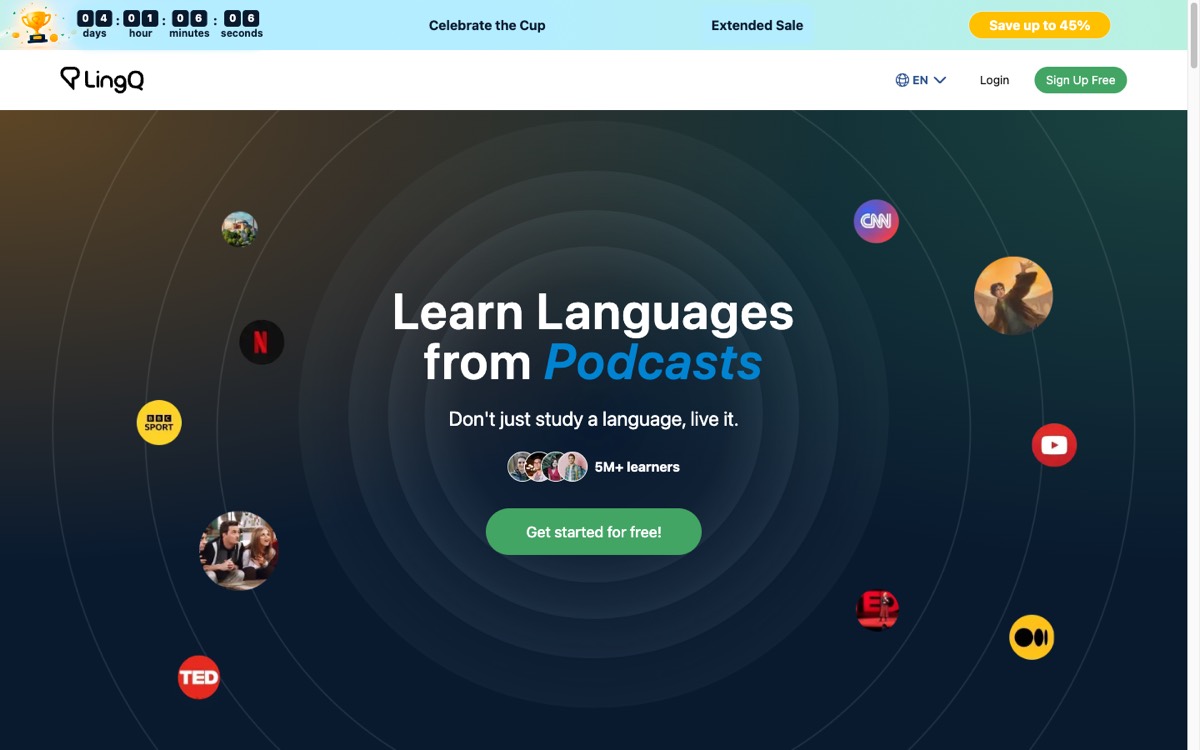 lingq.com, July 2026.
Importing is where LingQ beats everything else in this category. With the LingQ Importer extension for Chrome, Safari or Firefox, a YouTube video or a Netflix episode becomes a lesson in a couple of clicks, with the subtitles turned into text you can tap (YouTube lessons keep the video attached). YouTube videos need closed captions for this to work, according to LingQ’s importing guide. You can also bring in articles, ebooks and podcasts, and Premium includes AI transcription for audio that doesn’t come with a transcript, per the App Store listing.
If you’d rather not import anything, there’s a built-in library too, with lessons that LingQ’s Japanese page says were made by native speakers for native speakers, plus its Mini Stories and grammar guides. It runs on the web, on iPhone and iPad, and on Android, and one subscription covers more than 40 languages.
The software is the problem
Plenty of people like the app (it has 4.7 stars from about 10,000 App Store ratings), but next to newer apps the interface looks dated, and its release notes read like a steady run of repairs. The September 2026 update alone fixed a crash on launch and a crash when loading some lessons.
Japanese makes it worse. Japanese is written without spaces, so LingQ runs every lesson through a splitter that guesses where each word begins and ends, and it guesses wrong a lot. In December 2025, a learner on LingQ’s own forum with around 53,000 known Japanese words reported dozens of “new words” in a lesson, often with at least half of them not words at all: particles glued to nouns, で stuck onto adjectives, and って treated as part of a verb when it was a standalone particle. They put a lot of that down to Japanese itself, which is fair. Earlier that year, another user found that LingQ’s AI text splitting changed the text itself, turning ちっちゃな into ちってはな, which isn’t a word. LingQ staff replied that they’d fix it.
LingQ’s whole system runs on tapping and saving words, so this matters. Save a particle glued to a noun and your known-word count drifts, and a beginner has no way to tell which splits to trust.
Then there’s the free plan. It caps you at 20 saved words and 5 imported lessons (pricing), and 20 words of Japanese goes fast, so I’d treat it as a demo. Premium costs $14.99 a month, $119.99 a year, or $215.76 for two years, and the App Store charges the same for monthly and yearly. Premium Plus adds more AI transcription, AI voices, AI-simplified lessons and a stronger version of the Lynx AI chatbot, for $29.99 a month or $269.99 a year. No sale was running when I checked.
Why I’d pick Gravity for Japanese on a phone
Gravity is a Japanese-only app for iPhone, iPad and Android, built around a hand-picked library of Japanese YouTube videos: anime clips, songs, podcasts, streams, vlogs and lessons. It takes the opposite approach to LingQ on almost everything.
Transcripts checked before you see them
LingQ splits whatever text you hand it. Gravity only works with its own library, so we process and check every transcript before a video goes live, and we time it to the audio word by word. You aren’t the one catching bad splits, and the line on screen matches what you hear. Each line comes with furigana or romaji, an English translation, and each word’s meaning underneath.
Lookups that fit the sentence
Tap a word and Gravity shows the meaning that fits the line you’re in. Japanese needs that: かける can mean to hang, to call, to sit or to spend, and in 時間をかける you want “to spend time”. Tap “AIO explanation” and Aio, our axolotl, explains what the word is doing in that exact line. Tap “Save word” and it becomes a flashcard, reviewed with FSRS spaced repetition, and the back of the card replays the clip you found it in.
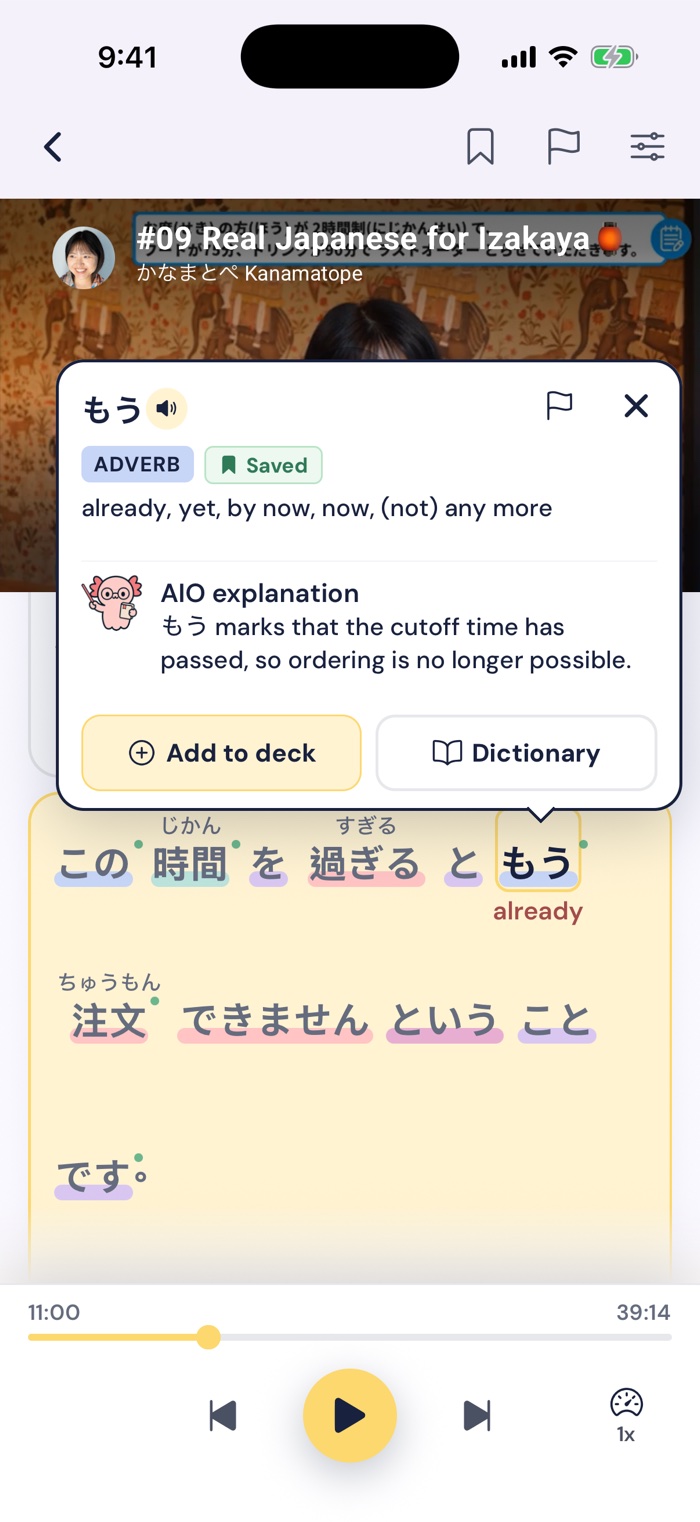
Tap もう in an izakaya lesson and Aio explains it in context: the last-order time has passed.
A levelled library instead of import-anything
With LingQ you can import almost anything, but you’re the one who has to find it. Gravity does the choosing: every video is levelled by hand from Pre-JLPT to N1, and you can filter by level. You give up choice, since you can’t add your own videos. In exchange, you skip the hunt for something at your level with decent Japanese subtitles, which is where a lot of immersion routines stall.
Moments, for the five minutes you have
Moments is a scrollable feed of short clips from the library, a minute or less each. You tap words and save them as you scroll. On a train or in a queue, I’d open that before I’d open a reading lesson.
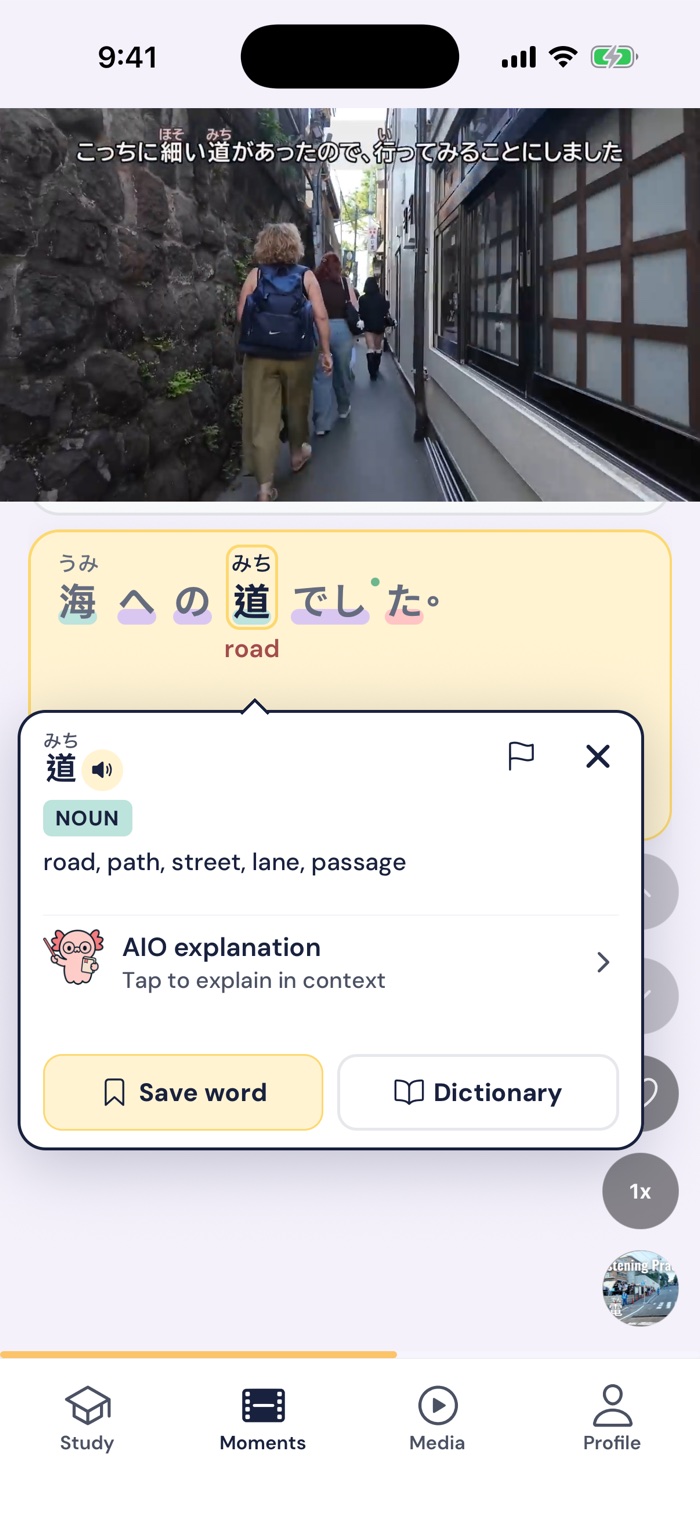
Moments: scroll short clips, tap any word, and save it.
An app that stays simple
Gravity is built for the phone and does a handful of things: watch, tap, save, review. There’s no extension, no import settings, and no lesson editor for fixing splits. If LingQ’s interface wore you out, that’s the difference you’ll notice first.
When LingQ is the better pick
Pick LingQ if you want to read. Gravity has no articles, books or reading lessons, and LingQ’s reader is built for exactly that. Pick it if you study more than one language, since one LingQ subscription covers all of them and Gravity is Japanese only. If you want to bring your own content, like a Netflix show, a favourite YouTuber or a podcast, LingQ can import it and Gravity can’t. And if you study at a desk, LingQ runs in the browser, while Gravity has no web or desktop version.
Gravity also won’t teach you grammar, so pair it with Tae Kim’s guide or Genki if you’re starting out.
Gravity vs LingQ at a glance
Prices are US prices, checked in September 2026.
| LingQ | Gravity | |
|---|---|---|
| Works on | Web, iPhone, iPad and Android | iPhone, iPad and Android |
| Price | Premium: $14.99/month or $119.99/year. Premium Plus: $29.99/month or $269.99/year | $14.99/month or $69.99/year |
| Free option | Free plan, capped at 20 saved words and 5 imported lessons | 7-day free trial |
| What you study | Its own library, plus anything you import: YouTube, Netflix, podcasts, ebooks, articles | A hand-picked library of Japanese videos levelled Pre-JLPT to N1, plus a feed of short clips |
| Japanese text | Split into words automatically, often wrongly | Processed and checked before each video goes live, timed to each word |
| Languages | 40+ | Japanese only |
FAQ
Is LingQ good for Japanese?
The method works for Japanese, and the import tools are the best around. The weak spot is word splitting: Japanese has no spaces, and LingQ often glues particles onto words or breaks words apart, which a longtime user on LingQ’s forum calls a longstanding problem. If you’re past the beginner stage and can spot a bad split, it’s still a solid reading tool.
Is LingQ free?
There’s a free plan, but it caps you at 20 saved words (LingQs) and 5 imported lessons, so it works more as a demo. Premium costs $14.99 a month or $119.99 a year in the US, the same on the website and in the App Store.
What’s a good LingQ alternative for Japanese?
If you want to watch and listen to real Japanese on your phone, Gravity is the one we built for that. If you want to mine Netflix at a computer, Migaku is worth a look, and I compared it with Gravity in Gravity vs Migaku. Our roundup of Japanese learning apps covers more options.
Summing up
LingQ has the right idea and the best importing in the category, and for reading or for learning several languages, it’s still what I’d point people to. For Japanese on a phone, the dated app and the word splitting get in the way. Gravity trades LingQ’s freedom for a levelled library, checked transcripts, and an app that stays out of your way.
Gravity has a 7-day free trial on the App Store and Google Play. If you want to try LingQ’s method first, its free plan is enough to see whether you like the reader, though 20 words won’t get you far.